
Choose the messages you want
Turn on the types of messages you want: crew messages, activity invitations, jumpseat requests or duty swaps. Leave the rest off.
FOR PILOTS AND CABIN CREW · IN DEVELOPMENT
iOS & Android
An app in development for pilots and cabin crew worldwide. Message colleagues on your flight. Find people to meet during a layover. Keep your duty plan in one place.
Privacy comes first. You choose which messages you receive. Other people do not see your decision unless you say yes.
Our first pilot project is for Eurowings crews. CrewNexo is an independent SilkIdea project, not an official airline app.
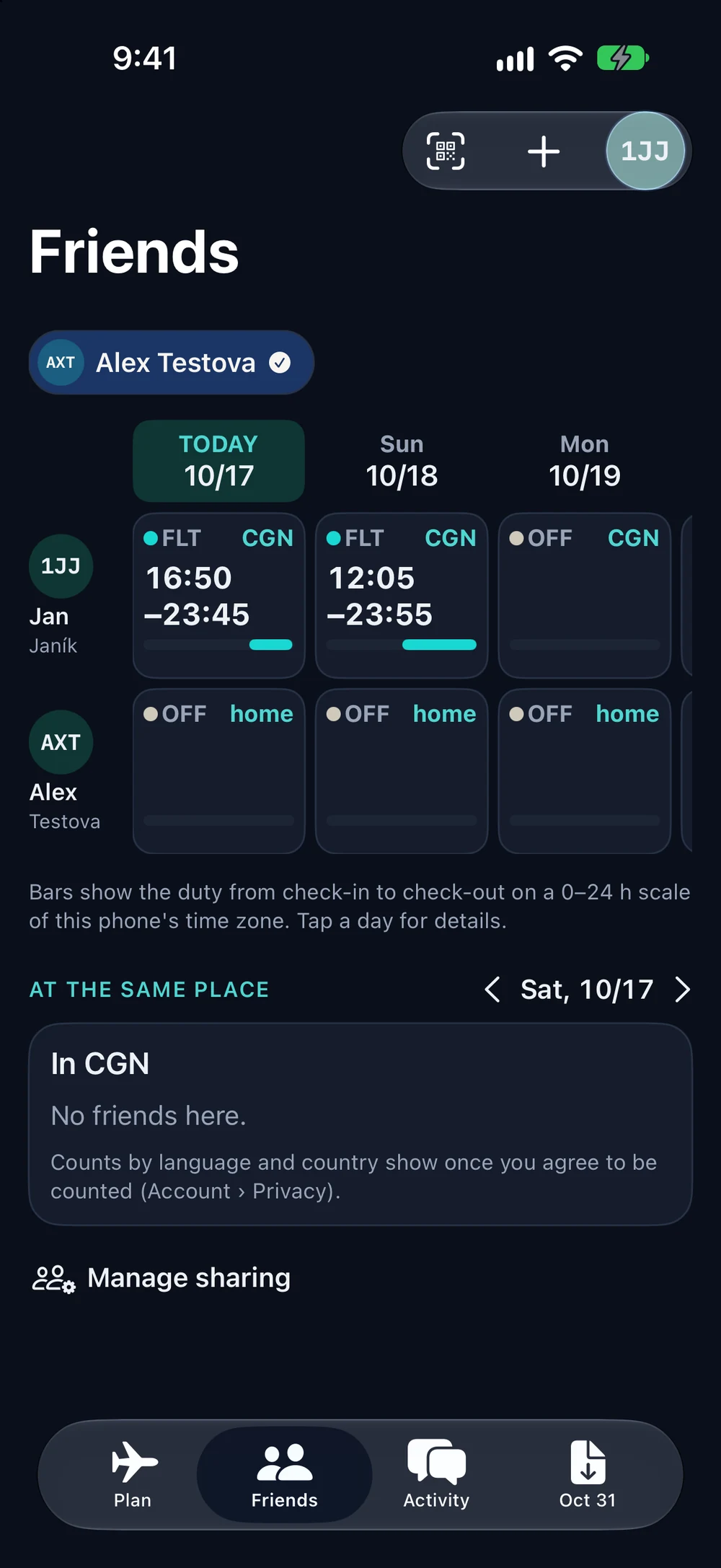
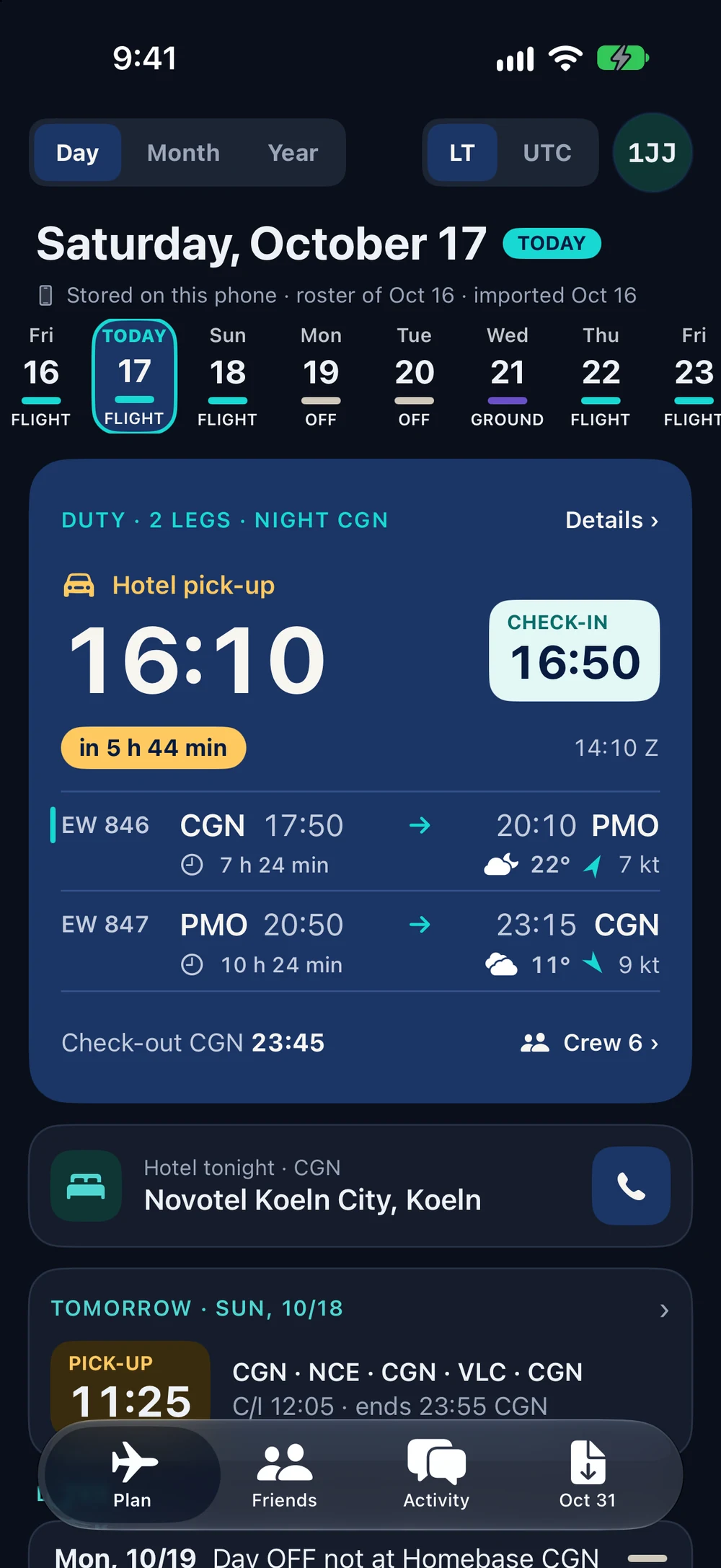
Screenshots from the iOS test version
PLANNED: CHAT AND MEETUPS
At the hotel, in the same city or on the same flight: contact colleagues without needing their phone numbers. People choose whether they want to receive invitations or be visible to others.
Send an anonymous message to colleagues on your flight who use CrewNexo and accept this type of message. The sender cannot see who received it.
See which colleagues are at the same hotel or in the same city, if they choose to be visible. Invite people who are free for sport, coffee, breakfast, lunch, shopping or a walk.
Only people who accept and confirm what to share join the chat. Make a plan together. Nobody sees who ignored or declined the invitation.
I would use this ↗THE APP TODAY
The test app reads a supported NetLine/Crew PDF and saves your duty plan on your phone. You can use the plan offline. Explore the daily plan, month and year views, shared days and roster import below. Activity, chat, jumpseat and duty offers show prototype examples. These screens are not a promise that every feature is ready.
Open a supported NetLine/Crew Individual duty plan PDF, or share it to CrewNexo. Your phone reads the file.
See your daily and monthly plan, flights, check-in and check-out. Hotel and pickup details appear when they are in your roster.
Switch between local time and UTC. Check duty and block times, the crew on each flight and the date of your last import.
iOS and Android test versions are being developed. The app is not yet released to the public. These pictures show iOS. The Android app may look different.
Check your pickup, flights and hotel in one place.
Screenshots from the iOS test version
Tap to open all 13 screens
PLANNED FEATURES
These features are planned. Some are already being tested. Please tell us which ones would help you most.
CONTACT THE CREW
Choose a flight, date and route. Send a request to crew members on that flight who use CrewNexo and have chosen to receive jumpseat requests. You do not see a list of recipients.
Crew members who accept can join a private chat after confirming what to share. An accepted request is not a seat booking or permission to fly. You must still follow airline procedures.
FIND A POSSIBLE SWAP
Select the duties you want to swap and say what you need instead: other days, time off or a destination. The app will look for possible swaps without showing everyone your full roster.
The planned check must cover both new rosters, qualifications, earlier duties and confirmed airline and FTL rules. Missing or old information cannot give a valid result. Both colleagues and the airline must still approve the swap.
CHOOSE WHAT TO SHARE
Connect with colleagues you know. Share selected dates and roster details to see when you are both free. You can stop sharing at any time.
Each person chooses separately what to share. Adding a friend or joining a chat does not share your roster automatically. You do not share other crew members’ personal details.
COFFEE, FOOD, SPORT OR A WALK
Find colleagues at the same hotel or in the same city who choose to be visible. Send an activity invitation to people who are free and want these messages.
Invite people for breakfast, lunch, coffee, sport, shopping or a walk in the park. Start with an anonymous invitation. You do not see the recipient list or who said no. People who accept confirm what to share, then join a private group chat. Nobody has to reply.
PICKUP, CHECK-IN AND NOTES
Set reminders for pickup, check-in and other tasks. Add your own notes. If your duty changes, see which reminders need to change.
You will choose reminder times and check that notifications are allowed on your phone. Later ideas include advice about sleep and meals, after review by experts. Phone settings can affect alarms, so keep your normal backup alarm.
IOS AND ANDROID
Use your roster offline. Update it across your devices when you are online again. We are developing the app for both iOS and Android.
For shared features, we plan to check your company email with a code and repeat this check every three months. Access to an email address does not prove a crew role or qualification. Further checks will be needed where roles matter.
LOCK SCREEN AND HOME SCREEN
See your current or next duty without opening the app. We plan home-screen and lock-screen widgets, Live Activities on iOS and duty notifications on Android.
Early versions are being tested. Background updates depend on the phone and its settings. The app cannot guarantee that every update or alert will arrive on time.
WEATHER FROM YOUR DUTY PLAN
Tap an airport to see its latest available METAR. Check the report time and when it was downloaded. A saved copy will be available offline.
An iOS version is being tested in the simulator. Online updates, background downloads and the Android version are still in development. A saved report may be old. Use your approved weather briefing for flight planning.
FREEMIUM · PLANNED
We plan to offer a useful free version. Extra features may be paid, such as a longer roster history, more export options or personal settings. Prices and limits are not decided yet. Privacy controls will be free.
Pilots and cabin crew worldwide. Our first pilot project is for Eurowings crews, starting with Eurowings Europe. Want CrewNexo for your airline? Tell us using the airline request form on this page. CrewNexo is made by Jan Janik / SilkIdea. It is an independent project, not an official airline app.
No. The plan is to show only colleagues who choose to be visible. You can also send an invitation to people who accept that type of message, without seeing their names first. A room number or full roster is not shared.
Early iOS and Android versions are being tested. There is no public release date yet. We want your feedback on the whole idea before we build all the features.
No. Always check duty and flight information in the official system. The airline still controls jumpseat permission, duty-swap approval and operating procedures.
No. The screenshots are from the iOS test version, including an early Friends view and airport weather. They do not mean that all sharing features are ready. Chat and meetups are planned. The plan may change as we test and hear from you.
HELP US TEST
Try an early version and help us improve it for real crew life. Choose your phone and leave the email for your invitation.
This registers your interest. Places and builds may be limited, so access is not immediate or guaranteed. You can also leave feedback without joining the beta.
OTHER AIRLINES
We are starting with Eurowings and want to bring CrewNexo to more airlines. Tell us which airline you work for and what would help your crew. We will use your email to reply.
YOUR FEEDBACK
Tell us what you like, what is missing and what you would change. Feedback from pilots and cabin crew is equally welcome.
You can send more than one comment and return later to add another. We keep every comment. Only your latest rating from this browser counts.

PRIVACY & TERMS
Read the app’s legal documents and find out how we use information from these website forms.